Reports & records · 6 min read
Build a record packet
Combine the records you choose into one polished PDF for a student and school year.
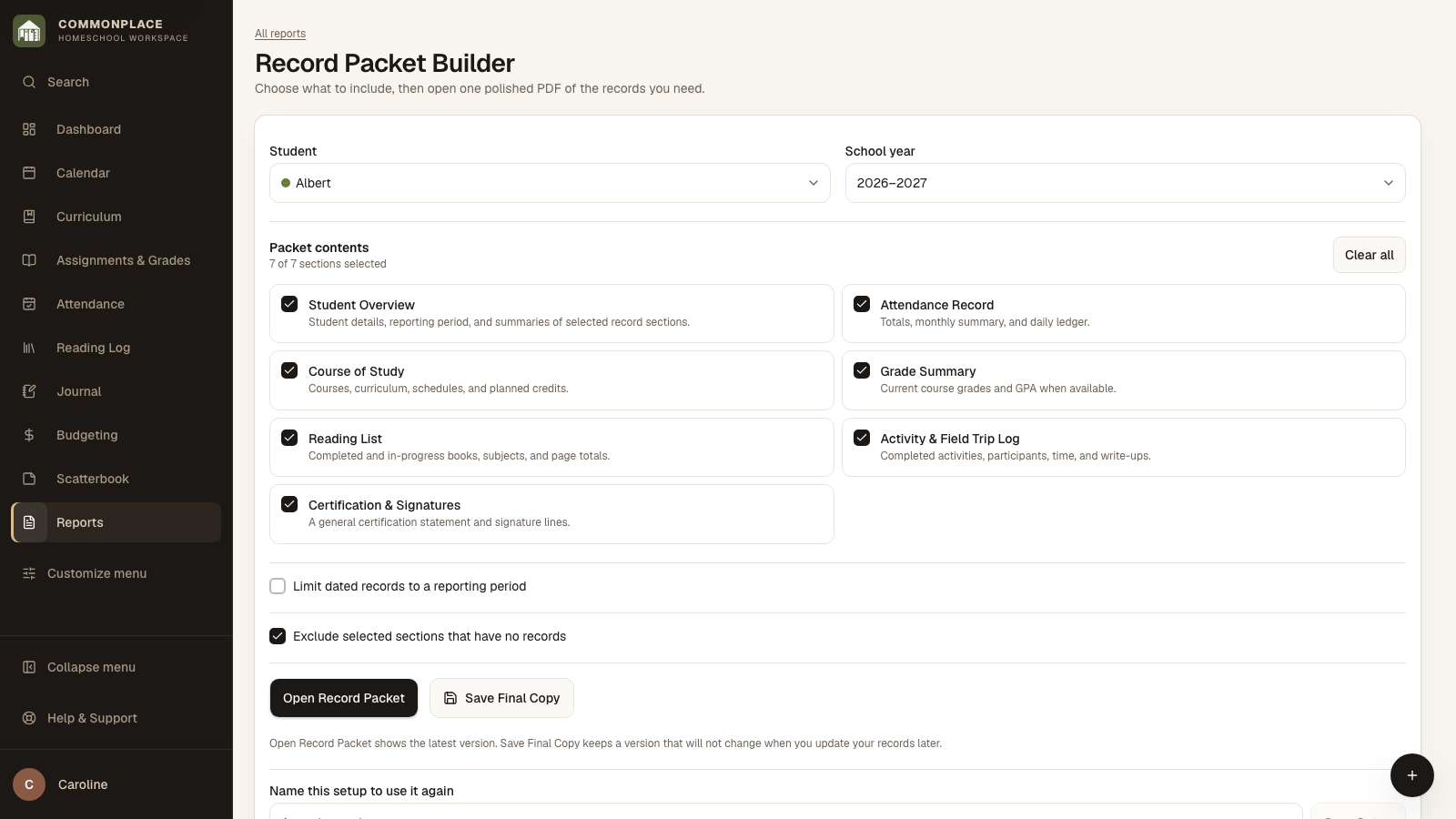
Open this area in CommonplaceThe Record Packet Builder combines selected records into one organized document. You decide what belongs in the packet, and you can save the setup when you expect to use the same combination again.
- 1
Choose the student and school year
Select whose packet you are creating and the school year it should use.
- 2
Choose the packet contents
Include any useful combination of the student overview, attendance, course of study, grades, reading, activities, and certification or signature pages.
- 3
Limit the dates when needed
Turn on the reporting-period option to limit dated attendance, grades, completed reading, and activities. The Course of Study continues to describe the full school year.
- 4
Leave out empty sections
Keep Exclude selected sections that have no records turned on when you want a clean packet without blank pages.
- 5
Open and review the packet
Choose Open Record Packet to see the latest information in a new tab. Print it or save it as a PDF after checking the details.
- 6
Save a dated PDF
Choose Save new version when you need an unchanging copy of what you shared. Later edits to Commonplace will not alter that saved PDF. Commonplace does not send it to anyone.
- 7
Reuse the setup
Name and save the packet setup when you want the same sections and empty-section choice next time.