Plan · 6 min read

Build loops and weekly rotations

Create flexible sequences that keep moving even when the week changes.

Open this area in Commonplace

A loop moves through its activities in order, one per scheduled day, even if yesterday’s work was not marked done. Use Pause on a day when you want to keep the same activity for the next scheduled day. A weekly rotation puts activities on specific weekdays, such as art on Tuesdays.

35 seconds · No sound needed

A rhythm that can flex with your day

A loop moves through an ordered list on scheduled days. Done marks today’s activity finished. It stays here today.

Read the video captions
  1. A loop moves through an ordered list on scheduled days.
  2. Done marks today’s activity finished. It stays here today.
  3. Choose Mark incomplete to reverse a completion.
  4. Pause keeps unfinished work for the next scheduled day.
  5. Resume brings it back today. Otherwise, it resumes next scheduled day.
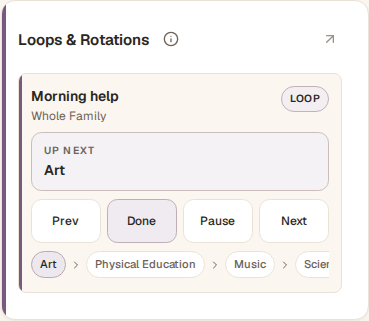
Commonplace dashboard showing a flexible learning routine
Fictional family data shown.
  1. 1

    Add a routine

    Open Loops & Rotations and choose Add Routine. Name the routine and choose Loop for activities that take turns, or Weekly Rotation for activities assigned to particular weekdays.

  2. 2

    Set the active period

    Choose the start date, optional end date, and active weekdays. Add a Time of Day when you want the routine to appear in Daily Flow.

  3. 3

    Add items

    Enter each activity, optionally connect a subject, then arrange the items in the order you want.

  4. 4

    Assign participants

    Choose the whole family or select individual students.

  5. 5

    Record what you finished

    On the Dashboard, Done marks a loop activity complete and Complete marks a rotation activity complete. The loop detail page uses Mark Complete. These buttons record completion; they do not move the loop forward immediately. Use Next if you want the next loop item today.

  6. 6

    End or reuse a routine

    End a routine without losing its history. Reactivate it later or duplicate it as a starting point for a new season.